
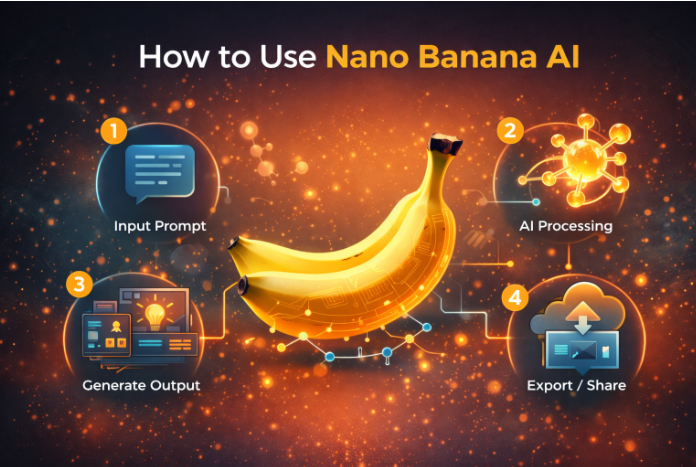
If you’re looking to dive into the world of AI-driven image creation, Nano Banana AI is a tool that will elevate your creative process. Whether you’re a business owner seeking better visual assets, a content creator experimenting with new ideas, or simply someone looking to add a unique touch to your digital work, Nano Banana Pro, powered by Gemini 3.0 Pro, brings professional results in record time. Let’s break down how to use Nano Banana AI to generate stunning images, including how to make the most out of its enhanced 4K resolution, sharper quality, and faster generation speeds.
What is Nano Banana AI?
Nano Banana AI is a powerful tool designed to help users create and edit images with advanced artificial intelligence. It’s built on the Gemini 3.0 Pro engine, which ensures not only sharper 4K resolution but also delivers faster image generations and more consistent character designs. Whether you’re creating images for websites, ads, or social media, this tool simplifies the process of visual creation while giving you the flexibility to refine your designs.
Key Features of Nano Banana AI:
- Sharper 4K Resolution: Create high-quality images that stand out with precision.
- Faster Image Generation: Complete your creative tasks in less time with rapid image output.
- Character Consistency: Achieve better consistency in your designs, perfect for brands needing coherent visuals across campaigns.
- Enhanced Editing Tools: Refine your creations with advanced editing options that let you control every detail of your images.
How to Use Nano Banana AI (Step-by-Step)
Step 1: Access Nano Banana Pro on Invideo
Nano Banana AI is available through Invideo, a platform known for its user-friendly AI tools. First, sign up for an Invideo account if you don’t already have one. Once you’re in, navigate to the “Nano Banana Pro” section to begin using the tool.
Step 2: Choose Your Image Creation Method
Nano Banana AI offers several ways to generate images. You can either start from scratch with a blank canvas or use one of the pre-existing templates available on the platform. Templates can be helpful if you’re looking for a quick starting point for your image creation process.
Step 3: Input Your Text Prompt
Nano Banana Pro is designed to work using text prompts. Simply describe the image you want to create, and the AI will turn your words into visuals. You can specify the type of scene, mood, colors, or even the composition. For example, if you want an image of a serene beach at sunset with soft hues and gentle waves, just input the text describing that scene.
Tip: The more specific you are in your prompt, the more accurate the AI’s output will be. Feel free to add details like lighting, setting, or even camera angles if that’s part of your creative vision.
Step 4: Edit and Fine-Tune Your Image
Once the image is generated, it’s time to refine it. Nano Banana Pro provides editing tools that allow you to adjust various elements of your image. Whether it’s tweaking the colors, adjusting contrast, or even adding additional elements to the image, the editing suite is intuitive and easy to use.
If you’re working on a character design, for instance, you can make the character look more dynamic by adjusting pose, expression, or background details. Nano Banana AI’s ability to maintain character consistency ensures that any adjustments you make will still feel aligned with the overall design.
Step 5: Download or Use Your Image
Once you’re happy with the result, it’s time to download your image or integrate it directly into your Invideo project. Nano Banana Pro supports high-resolution exports, ensuring that your final image is ready for use in any project, whether it’s for a website, social media post, or ad campaign.
Pro Tip: If you’re creating multiple images for a campaign, you can use the consistent design and character features in Nano Banana AI to ensure that your visuals remain cohesive across your entire project.
Additional Features You Can Leverage with Invideo
While Nano Banana Pro excels at creating stunning images, Invideo’s broader suite of tools adds even more value to your creative workflow. In addition to image generation, Invideo offers AI-powered tools for video and voice generation, making it a one-stop-shop for all your content creation needs.
AI Video and Voice Integration
In addition to images, Invideo allows you to create professional videos powered by AI. This includes the automatic generation of video scripts, scenes, voiceovers, and even background music, all from text prompts. Nano Banana Pro seamlessly integrates with Invideo’s video editing tools, meaning you can take your AI-generated images and turn them into full video presentations in just a few clicks.
Moreover, if you need voiceovers, Invideo’s AI Voice Generator allows you to add professional-sounding voiceovers to your videos, further enhancing the quality of your content. You can choose voices from a wide range of languages and accents, ensuring that your video reaches a global audience effectively.
Why Nano Banana AI is a Game-Changer
For anyone involved in content creation, whether in business, marketing, or personal projects, Nano Banana AI offers a revolutionary way to create stunning visuals with ease. By automating the time-consuming aspects of image generation and editing, it gives creators more freedom to focus on the larger narrative or strategy behind their work. Here’s why it stands out:
- Speed and Efficiency: With faster image generation, creators can complete projects in a fraction of the time it would take with traditional methods.
- High-Quality Output: The tool’s 4K resolution and consistent character design make it ideal for professional use.
- Creative Freedom: The AI’s ability to generate images based on text prompts allows for unlimited creative possibilities.
- Seamless Integration: Nano Banana Pro works smoothly within the Invideo ai video apps, enhancing your workflow by connecting image, video, and audio creation.
Conclusion
Nano Banana AI, powered by the Gemini 3.0 Pro engine, has transformed the way creators approach image generation. With its sharper resolution, faster processing times, and enhanced character consistency, it provides a level of professional-quality output that was once reserved for high-end studios. Whether you are using it for static images, as part of your broader video project on Invideo, or simply creating characters and visuals for social media, this AI tool opens up endless creative possibilities.
By simplifying the creative process while ensuring that the final output meets professional standards, Nano Banana AI is an invaluable asset for anyone looking to elevate their content creation game. Dive in today, and see how it can enhance your creative process.

Leave a Reply